Review
Preview local work
Send a live application preview to a teammate, client, or another device without deploying it first.
Public URLsBeta
Give your local web service a public HTTPS link. Share a preview, test a webhook, and keep building on your machine.
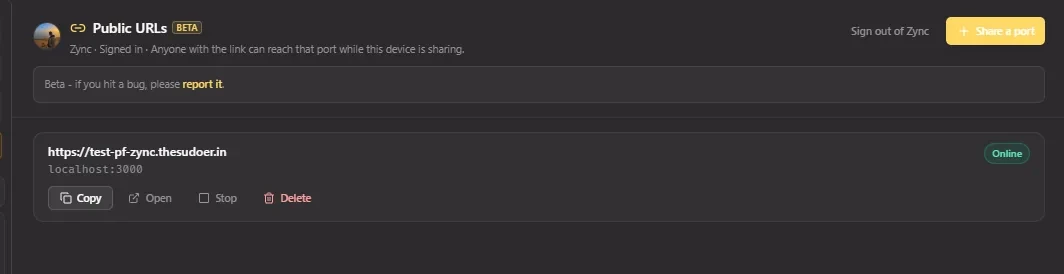
Small link. Useful possibilities.
For the moments when localhost needs an outside caller.
Review
Send a live application preview to a teammate, client, or another device without deploying it first.
Integrate
Give a third-party service a reachable HTTPS endpoint while your local webhook handler is running.
Authenticate
Exercise browser-based callback flows against a public endpoint that routes to your local application.
Realtime
Carry WebSocket traffic through the WSS endpoint for local realtime interfaces and development servers.
Stay in control
Anyone with the active link can reach your service unless you add a visitor password. Share only what you intend to make reachable.
Read the security modelAdd a visitor password before sharing a service that should not be openly reachable.
Pause the agent connection, restart a saved share, or delete the URL when the task is finished.
Stopping the local service alone can leave the link active and returning connection errors. Stop or delete the share to end access.
Owned active, reserved, and stopped URLs count toward the current hard cap of three.
A separate product
Public URLs uses its own account and relay. It does not depend on an SSH session.
Compare Public URLs and SSH forwarding
| Detail | Public URLs Beta | SSH port forwarding |
|---|---|---|
| Target | A localhost service on this device | A target reached through SSH |
| Access | Public HTTPS or WSS link | Local, remote, or SOCKS endpoint |
| Account | Separate GitHub or Google share sign-in | Your SSH host credentials |
| Lifetime | While the desktop share agent is running | Usually tied to the SSH transport |
Drive Sync is separate too. Public URLs sign-in does not grant access to your Drive app data, and Drive Sync does not create a sharing account.
Public URLs FAQ
Answers about availability, exposure, account boundaries, and how sharing differs from SSH forwarding.
No. Public URLs uses a separate Zync account, desktop share agent, API, and HTTPS/WSS relay. It is not SSH -L, -R, or -D.
The desktop share agent on this device must keep running. Closing the local service can leave the URL online but returning connection errors until you stop it.
No. The desktop agent accepts loopback targets only: localhost, 127.0.0.1, or ::1.
The user-facing Public URL is for HTTP and WebSocket services through HTTPS or WSS. Use SSH port forwarding for local, remote, or SOCKS network tunnels.
Not in the current Beta. Zync issues the public hostname for each share. Custom domains and team sharing controls are not available today.
No. Public URLs sign-in and Google Drive Sync use separate OAuth clients and separate product boundaries.
Open Public URLs in Zync, choose a port, and share when you are ready.